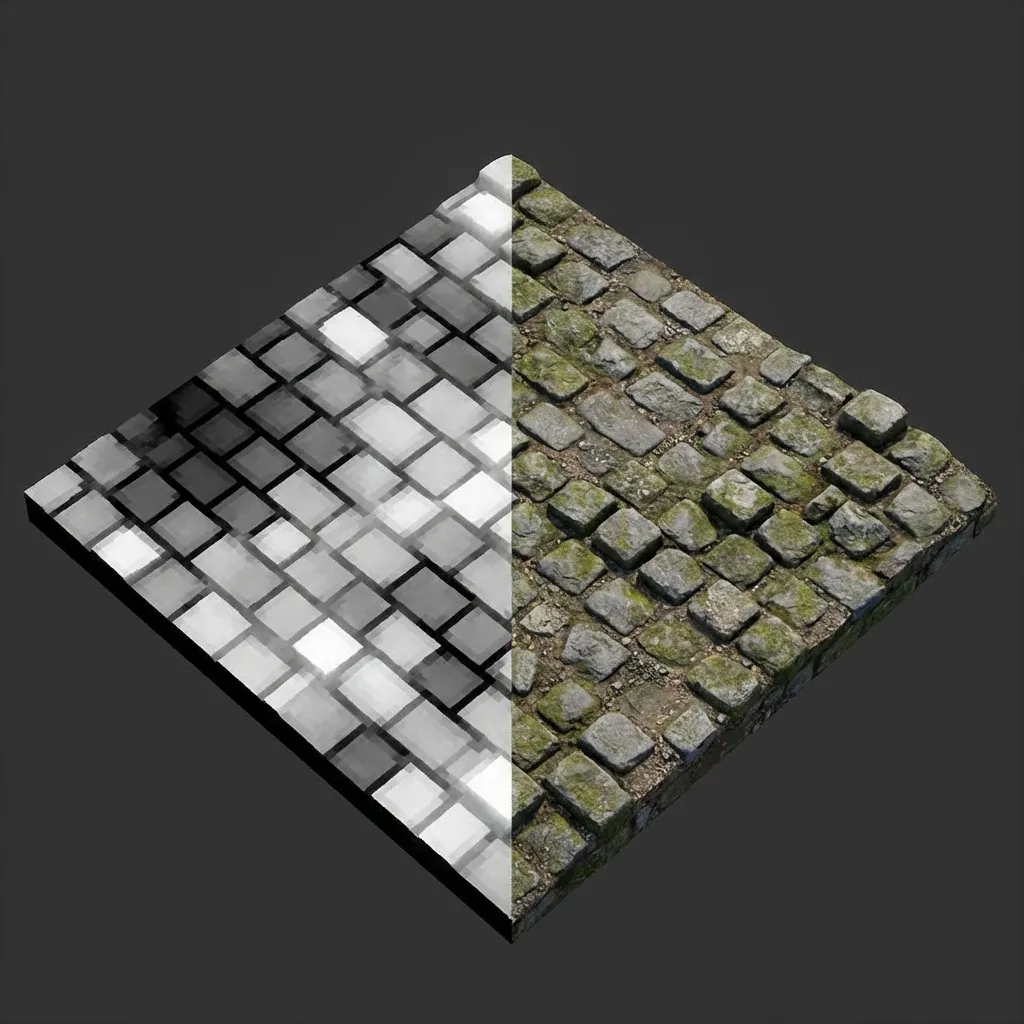
Data vs. Reality: Left side shows the Height Map (white = high), Right side shows the actual Displaced Geometry.
When building PBR materials for games or 3D visualization, you will inevitably encounter three closely related concepts: Height Maps, Displacement Maps, and Normal Maps. While they all deal with surface detail, they serve different purposes and operate through fundamentally different mechanisms. Understanding when and how to use each one is critical for creating realistic, performant 3D assets.
What is a Height Map?
A Height Map (also known as a Bump Map in some contexts) is a grayscale image that stores elevation data for a surface. Each pixel represents a relative height value:
- White (1.0): Maximum elevation — the highest peaks and ridges.
- Black (0.0): Minimum elevation — the deepest valleys and crevices.
- Gray (0.5): Neutral mid-point — the base surface level.
- Gradients: Smooth transitions represent slopes and inclines.
The height map is fundamentally just data — a 2D representation of 3D elevation. By itself, it does nothing. What matters is how your 3D software or game engine interprets that data. The same grayscale height map can be used to drive bump mapping, parallax occlusion mapping, displacement mapping, or even terrain generation — each technique produces a different visual result from identical input data.
Common Sources of Height Maps
Height maps can come from many sources: they can be hand-painted in Photoshop or Substance Painter, photographed and extracted from real-world surfaces, procedurally generated using noise algorithms like Perlin or Voronoi, or automatically derived from albedo textures using tools like our Free Normal Map Generator which produces height maps alongside normal maps, roughness maps, and AO maps from a single image upload.
Displacement Mapping: True Geometric Depth
Displacement Mapping takes the elevation data from a height map and physically pushes the vertices of your 3D mesh upward or downward in 3D space. Unlike normal maps which merely fake the appearance of depth through lighting tricks, displacement literally reshapes the geometry of your model at render time.
Displacement changes the silhouette. It casts real shadows, creates true parallax depth, and physically occludes other nearby objects. The depth is not an illusion — it is real geometry.
How Displacement Works Under the Hood
When a displacement map is applied, the renderer examines each vertex of the mesh and offsets its position along its surface normal by an amount proportional to the brightness of the corresponding height map pixel. White pixels push vertices outward (creating peaks), black pixels push them inward (creating valleys), and gray pixels leave vertices at their original position.
The Performance Cost of Displacement
Because displacement moves actual vertices, the quality of the result depends entirely on having enough vertices to move. Apply a displacement map to a basic 6-face cube and virtually nothing happens — there simply aren’t enough vertices to represent the surface detail. To get useful results, you need Tessellation (hardware-based subdivision in the GPU pipeline) or Subdivision Surface modifiers to dynamically add geometric density.
This additional geometry comes at a significant performance cost. Each tessellated triangle generates multiple sub-triangles, and each new vertex must be transformed, lit, and rasterized by the GPU. For this reason, displacement mapping is typically reserved for:
- Film and offline rendering where frame time is not a constraint.
- Terrain systems in game engines where LOD (Level of Detail) manages tessellation density based on camera distance.
- Hero assets that need true silhouette detail visible at close range (e.g., a stone wall the player walks right next to).
Parallax Occlusion Mapping: The Middle Ground
For real-time applications that need more depth than normal maps but cannot afford full displacement, Parallax Occlusion Mapping (POM) offers an excellent compromise. POM uses the height map to perform per-pixel ray marching inside the shader, creating a convincing illusion of depth with proper self-occlusion and parallax shifting — all without adding any new geometry. The silhouette remains flat, but within the surface boundaries, the depth effect is remarkably convincing.
Comparison: Normal Map vs. Height Map vs. Displacement
| Feature | Normal Map | Height Map (as Bump) | Displacement Map |
|---|---|---|---|
| Visual Effect | Faked lighting detail | Faked depth perception | True geometric deformation |
| Silhouette | Flat / Unchanged | Flat / Unchanged | Changed / Real 3D |
| Performance | Nearly free | Very cheap | Expensive (tessellation required) |
| Self-Shadowing | No | Limited | Yes (real geometry casts shadows) |
| Data Format | RGB image (tangent-space vectors) | Grayscale (single channel) | Grayscale (single channel) |
| Best Use | Fine micro-detail (pores, scratches) | Subtle surface variation | Large-scale deformation (terrain, walls) |
Practical Workflow: Combining All Three
Professional artists rarely use just one technique in isolation. The best results come from layering multiple map types together:
- Start with a Displacement Map for the large-scale features — the broad contours of bricks, the rolling hills of terrain, the major grooves in wood grain.
- Add a Normal Map on top for the fine micro-detail — the tiny pores in concrete, the hairline cracks, the subtle fabric weave that would be too small for displacement to capture.
- Use Height/Parallax as a shader-level enhancement for medium-scale features where full displacement is too expensive.
Our Normal Map Online Generator automatically produces both height maps and normal maps from your source textures, giving you a complete set of depth information to work with in Unity, Unreal Engine 5, Blender, or any PBR-capable application.
Further reading: Learn more about normal map fundamentals in What is a Normal Map?, or see how roughness interacts with surface detail in Roughness Maps Explained.